One system for inventory, jobs, scheduling and the money.
Everything we walked through on the call, costed and scheduled — with three ways to take it on, so you can move at whatever pace suits the business and the office.
Prepared forElite Hardwood Flooring, Inc.
DateSeptember 4, 2026
Full build$19,500
Prepared byWattz Web Design & Marketing
What we heard
Four problems, all of them the same problem
Nothing here is a guess — these are the things you raised on the call. Every one of them comes from the same root cause: the inventory, the jobs, the schedule and the invoices live in four different places, so none of them can tell you what the others know.
“It’s the small stuff where the guys can come in grab something, they don’t write it down.”
On inventory — no accountability on pulls
“I type it all in Excel and I convert it. But then to do a work order for one of the crews, I got to go back in and just retype everything.”
On proposals — the same job typed three times
“That was almost nine months ago… we had to wait nine months to collect 11 grand that they owe us.”
On job status — one stalled job, settled $1,500 light
“We do scheduling like on a whiteboard now, like a dry erase calendar, and it’s a pain.”
On scheduling — nothing the crews can see
None of this is theoretical.Every function in this proposal is already built and running for another company. This is assembly and tailoring for Elite, not invention.
Scope
The four phases
Ordered the way you said you’d want them — inventory first, so your returning employee has something to run from day one, then the paperwork that costs you the most time, then the crews, then the integrations that turn it all into numbers.
1
Inventory & the warehouse
The part you said to start with — and the part your returning man can run from day one.
$5,0003 – 4 weeks · in the full build
Item catalogue: flooring by species, grade, width and construction, plus sundries, finish, stain, abrasives and adhesive
Cartons and square feet handled together — stock counted in cartons, costed per square foot
Cost per square foot and your sell price stored on every item
On hand / reserved to a job / actually free, on one line
Barcode scanning from a phone, tablet or a Bluetooth scanner (under $100)
Reuse vendor barcodes, or generate and print your own shelf labels
Reorder points per item, with an automatic shortage list
One click turns that shortage list into a purchase order
Receiving: log a delivery against its PO and it lands in stock
Stock movement history — who pulled what, for which job, when
A guided first count so the initial inventory can be entered once, cleanly
Closes the gap you described — the small stuff where the guys grab something and don't write it down. Every pull is attached to a person and a job.
2
Customers, proposals & getting paid
Kills the retyping, and stops jobs going quiet with money still on them.
$6,0004 – 5 weeks · in the full build
Customer records — contacts, addresses, terms, full job history, balance
Proposal builder with a reusable price book, so line items are picked not typed
Proposal numbers increment themselves — no more writing down the next one
One proposal, two packages: the customer picks A or B and the total updates
Accepted proposal becomes an invoice and a work order with no retyping
Pick individual lines off a proposal to build a purchase order
E-signature and deposit collected online at acceptance
Lead converts to an active customer automatically on signing
Invoices tab with an overdue filter, and overdue front and centre on the dashboard
Automatic payment reminders so nothing sits at 60 days
Two-way QuickBooks sync — invoices, payments and customers stay matched
Customer list built for marketing, ready for phase 4
This is the phase that pays for itself. The job that sat nine months cost you $1,500 in a settlement you shouldn't have had to offer.
3
Jobs, scheduling & the crew's phones
Retires the dry-erase calendar and the manila folders.
$5,0004 weeks · in the full build
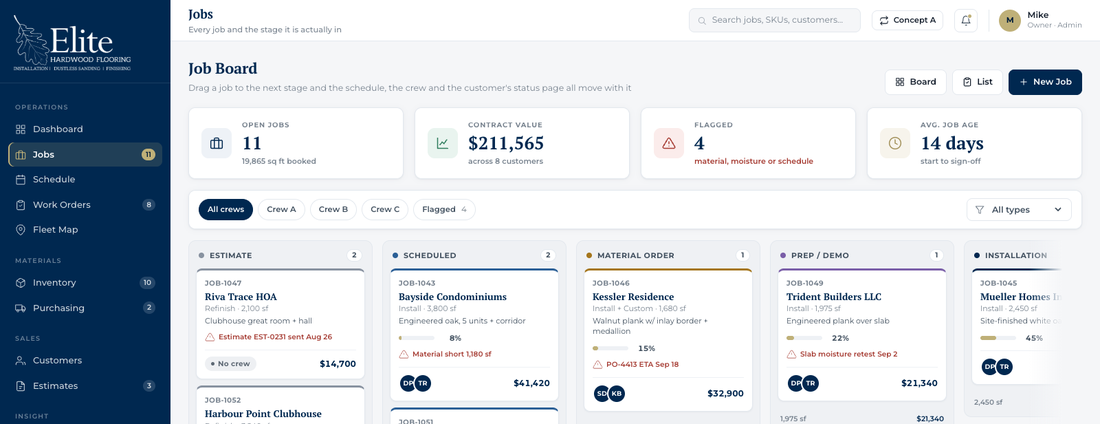
Job records that move through your real stages, estimate to punch list
Material assigned to a job, with a waste factor, reserved out of stock automatically
Schedule by crew and by day — drag a job to move it
Wall-screen mode for the office TV that refreshes itself as things change
Crew portal on any phone — they log in once and stay logged in
Each crew sees only their own jobs for the day
Clock in and out per job; labour cost lands on that job
Work orders live in the same portal, no paper needed
Photos straight from the phone camera, filed to the right job automatically
Automatic 5:00 a.m. schedule sent to every crew by text or email
Estimates and site visits sit on the same calendar as production
Customer status page — a link you text the homeowner that updates itself
Everything is mobile. Anything you can do at the desk, the crew can do from the truck.
4
Fleet tracking, reporting & follow-up
Turns the trackers you already pay for into job costing.
$3,5002 – 3 weeks · in the full build
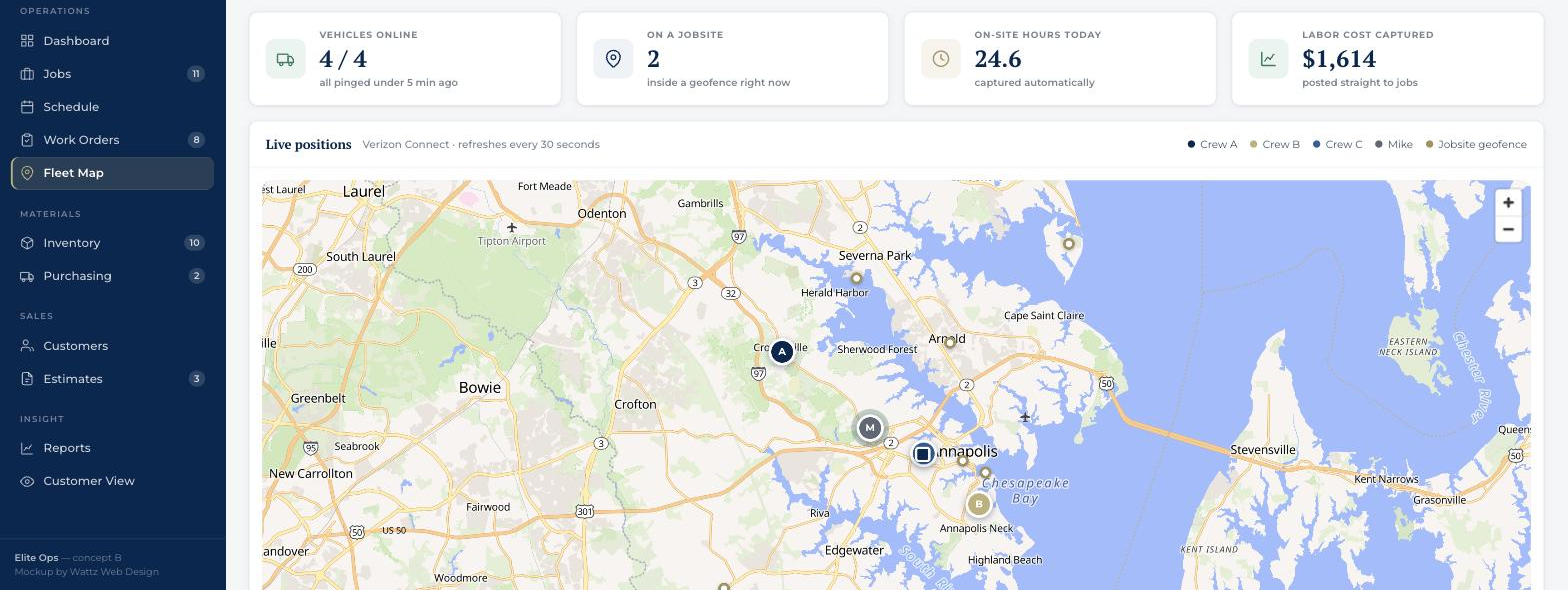
Live map of every vehicle, pulled from Verizon Connect
Geofence each jobsite — arrival and departure detected automatically
On-site hours per truck per job, with no one having to remember to clock in
Those hours post to the job as labour cost on their own
Idle time and mileage per vehicle
Reports: revenue, gross margin and profit by job
Material usage and real waste percentage by species
Crew productivity — square feet per hour, rework rate
Where work comes from — builder, designer, repeat, web
“Happy birthday to your floor” anniversary campaign, sent automatically
Email and text templates you control
Admin alerts when a customer hits their anniversary
You are already paying Verizon for this data. Right now it only tells you where a truck is; after this it tells you what a job cost.
Prices above are each phase’s share of the full build. Taken one at a time, every phase after the first carries a re-mobilization charge — the comparison is in the table further down.
Not included in any phaseScanning or keying in historical paper records. Anything already digital we can import; the manila folders are a separate job and we’d scope it once you’ve decided how far back you want to go.
Ways to buy
Three ways to take it on
You asked what it looks like all at once, and what it looks like doing two at a time. Here is all three, including phase by phase. The work and the finished system are identical — only the pace and the cash flow change.
Best value & fastest
All at once
$19,500
10 – 12 weeks, one engagement
$2,000 less than taking it phase by phase
Live in about three months instead of five
Built as one connected system, nothing re-opened later
One changeover for the office instead of four
Three payments of $6,500
Two at a time
$20,500
~14 weeks across two blocks
Block one: inventory + paperwork — $11,000
Block two: crews + integrations — $9,500
A natural pause between blocks to absorb the change
$1,000 less than phase by phase
Each block billed in thirds
Phase by phase
$21,500
~20 weeks, stop any time
Lowest commitment — $5,000 to start
Approve each phase before the next one begins
Easiest on cash flow
Longest to a fully connected system
You can stop after any phase and keep what is built
Why phasing costs moreIt isn’t a penalty for going slow — it’s what stopping and starting actually costs. Each separate block means picking the work back up, re-testing integration points that were already stable, and running its own deployment and training day for the office. Two blocks adds $1,000; four separate phases adds $2,000. The entry price is the same either way — $5,000 starts you, whichever route you pick.
Phase
What it covers
Timeline
In the full build
Taken on its own
1
Inventory & the warehouse
3 – 4 weeks
$5,000
$5,000
2
Customers, proposals & getting paid
4 – 5 weeks
$6,000
$6,750
3
Jobs, scheduling & the crew’s phones
4 weeks
$5,000
$5,750
4
Fleet tracking, reporting & follow-up
2 – 3 weeks
$3,500
$4,000
Two at a time — two blocks of two
$20,500
Total build
$19,500
$21,500
Included in the build price
Design, build, testing and launch of everything listed
Your data loaded — inventory, customers, price book
Keeping the QuickBooks and Verizon connections alive
Support, and a monthly allowance for small changes
Barcode scanners (~$60–100 each, bought direct)
Your existing QuickBooks and Verizon Connect subscriptions
Historical paper record entry, if you want it
Integrations
The two systems you already pay for
Neither of these gets replaced. Both get connected, so the data you are already collecting starts doing something useful.
QuickBooks
Confirmed — standard integration
QuickBooks stays exactly where it is. It is the right tool for your accountant and there is no reason to move off it. What changes is that it stops being somewhere Linden has to retype things into.
Invoices raised in the platform appear in QuickBooks automatically
Payments recorded either side stay matched
Customers stay in step, no duplicate records
Your accountant’s reports keep working, untouched
Verizon Connect
Researched & confirmed available
I’ve been through Verizon’s developer documentation since we spoke. Reveal publishes a full REST API and the pieces you need are all there — and importantly, API access is included with your existing Reveal subscription, not a paid add-on.
Vehicle Location — latest GPS position and status, for the live map
Vehicle Segment Data — stops, drives and idles, already separated by Verizon
Geofence — jobsite boundaries with entry and exit events
Vehicle GPS History — where a truck was, over any date range
Webhooks — Verizon pushes position events to us, so nothing is polled
The part that matters for job costingGeofence plus webhook is the combination that answers what you asked for. Draw a boundary around a jobsite, and the truck crossing it starts and stops the clock. On-site hours land on the job as labour cost with nobody having to remember to clock in — the phone clock-in stays as a backup for the days somebody parks down the street.
Prices above are each phase’s share of the full build. Taken one at a time, every phase after the first carries a re-mobilization charge — the comparison is in the table further down.
One thing only you can doVerizon issues integration credentials to the account holder, not to a developer. You’ll need to request REST integration credentials from inside your Reveal account, and confirm which tracker model is in the vans. It’s a short request and it’s free — but it has a lead time on Verizon’s side, so it’s worth starting now even if you take the phased route and phase 4 is months away.
Mapping costs nothingThe live map uses open map data with no account, no key and no per-view fee — so there’s no third map subscription to add. The screen below is the real thing, running with your jobsites and vans on it.
You pick a route and we startDeposit invoice, and I set up your environment the same week.
A short working session on inventoryAn hour or two with you and the man running the count, to get categories, locations and reorder points right before anything is built.
You see it every weekA working link, not a status email. You click through the real thing and tell me what’s wrong while it’s cheap to change.
Your data goes in before launchInventory, customers and the price book are loaded and checked so day one is a real day, not a setup day.
Training in the officeYou, Kevin, PJ and Linden at the desk; the crews on their own phones. Short sessions, on the real system.
Thirty days of adjustmentsAfter each phase goes live, changes that come out of real use are included.
Terms
Detail
Payment
One third to start, one third at the midpoint, one third on delivery. Per phase, or per block, depending on the route you pick.
Ongoing
$250 per month, beginning 30 days after the first phase goes live.
Ownership
The system and all data in it are yours. No per-user fees, no per-seat licence, ever.
Validity
This proposal holds for 30 days, to October 4, 2026.
What I need from you
Verizon Reveal integration credentials, QuickBooks admin access, your current price list, and a couple of hours of Kevin’s time on how proposals are actually written today.
What it’s worth
One job went quiet for nine months. $11,000 sat uncollected, and you settled $1,500 light just to close it — and by your own account, that isn’t the only one. Add the hours Kevin and PJ spend retyping a proposal into a work order and then again into a purchase order, on every job you sell. Add the stock that leaves the shelf without a name on it. This isn’t a system that pays for itself on one rescued invoice — it pays for itself on the pattern, and the pattern runs all year.